

Knowledge Base
Open the School Administrator Menu
The school menu provides navigation to all major setup areas. This is the main navigation area for school administrators.
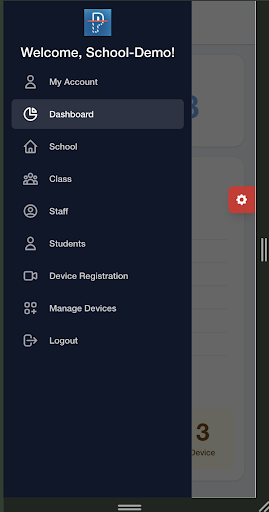
Main sections:
- My Account: Update your personal profile, change your password, or manage saved payment methods.
- Dashboard: View real-time school statistics, including counts for students, staff, classes, vehicles, devices, and successful pickups.
- School: View and update school details such as institution name, unique school code, and location address.
- Class: Create and organize classes by grade and section, assign teachers to classes, and view classroom rosters.
- Staff: Add, edit, or remove school personnel and define their user roles.
- Students: Add and manage student profiles, link parents to students, and verify authorized vehicle registration data.
- Device Registration: Connect new LPR cameras to the school network.
- Manage Devices: Monitor the operational status of all registered cameras.
- Logout: Sign out of the PLACA.AI portal.
Use the side menu to move between school settings, class setup, student records, staff records, and device management.