

Parking Lot Owners & Operators
Parking Software Pricing for Lot Owners & Operators
Run your own lots or manage parking locations for others. Start with free QR software, then add camera recognition or gate control where your operation needs it.
Send your details. We’ll set up your free account and email your access instructions.
Choose the parking workflow
Free QR software. Optional camera and gate services.
No camera subscription is required for QR self-parking. Choose paid LPR only when your site needs automatic recognition or gate-controlled parking.
QR self-parking software
Let drivers scan a QR code, register their vehicle and pay in a mobile browser.
- Unlimited QR parking sessions
- No required camera subscription
- Convenience fees on paid sessions
Parking LPR without barriers
Record plates automatically and match them to QR parking sessions for enforcement without gates.
- Software and 4G included
- Camera compatibility and placement reviewed
- Hardware and installation separate
Gate-controlled parking
Automate entry records and payment-controlled exit with compatible gates or boom barriers. At least two cameras: $198/month for software and 4G.
- Software and 4G included
- $949 camera hardware; $199 relay
- Gate equipment and site work separate
Transparent transaction costs
See what the driver pays
Keep the parking charge, PLACA convenience fee and payment processing clear. The fee is displayed before payment confirmation.
| Session type | Fee | Minimum | Maximum |
|---|---|---|---|
| Standard parking | 8% | $1.49 | $4.95 |
| Premium event parking | 8% | $1.49 | $9.95 |
The software subscription is free. Fees are separate from the parking charge and are displayed before payment confirmation. Payment processing and taxes are separate where applicable.
A transparent example
See the parking convenience fee
Enter a parking charge to see the 8% fee with its minimum and maximum applied.
- Parking charge
- $10.00
- Convenience fee
- $1.49
- Subtotal
- $11.49
Illustration only. Taxes and payment processing are not included in this subtotal.
QR parking vs. LPR parking
Choose how vehicles enter, pay and leave
QR codes connect drivers to registration and payment. License plate recognition (LPR) adds automatic vehicle records. Use LPR with gates for automated access and payment-controlled exit, or without gates to check parking compliance.
| What changes? | QR-only self-parking | LPR with gates or boom barriers | LPR without barriers + QR |
|---|---|---|---|
| Vehicle record | Driver enters the plate when scanning the QR code. | Cameras record the plate and entry/exit times. | Cameras record plates and entry/exit activity for comparison with QR sessions. |
| Driver payment | Register and pay in a mobile browser. | Scan QR, download or open the app, enter the plate and pay the balance matched to the recorded stay. | Scan QR, enter the plate and pay; LPR matches the vehicle to its parking session. |
| Access or enforcement | Operator checks registered sessions, payments and permits. | Entry is recorded before the barrier opens; confirmed payment releases the exit barrier. | After 15 minutes, a vehicle still on site without valid parking authorization is flagged for review. |
| Camera requirement | No LPR camera required. | At least two physical cameras: one for entry and one for exit. More lanes may need more cameras. | Camera coverage for entry and exit; quantity depends on the lot and its lanes. No barrier required. |
| Software subscription | Free QR software; paid-session fees apply. | $99 per physical camera/month including 4G. Two cameras: $198/month, before equipment. | $99 per physical camera/month including 4G. QR software remains free; paid-session fees apply. |
| See the workflow | QR registration and payment | Automated gated parking | Open-lot parking enforcement |
Hardware, installation and applicable transaction fees are separate from LPR subscriptions. Review parking convenience fees.
QR-only: scan, register and pay
The driver scans the posted QR code, enters the vehicle’s license plate and parking details, reviews the charge and convenience fee, and pays in a mobile browser. No separate app, camera subscription or gate is required. Your team can review registered sessions, payments and permits; QR alone does not automatically capture every vehicle entering or leaving.
Explore Mobile Park & Pay QR parkingParking operations
Review occupancy, parking utilization and payment activity across the locations you manage.
Permits and enforcement
Coordinate permit checks, patrol records, violation review and digital ticketing where configured.
Reporting and access
Review revenue analytics and reporting, adjust dynamic pricing, and plan compatible barrier or boom-gate access.
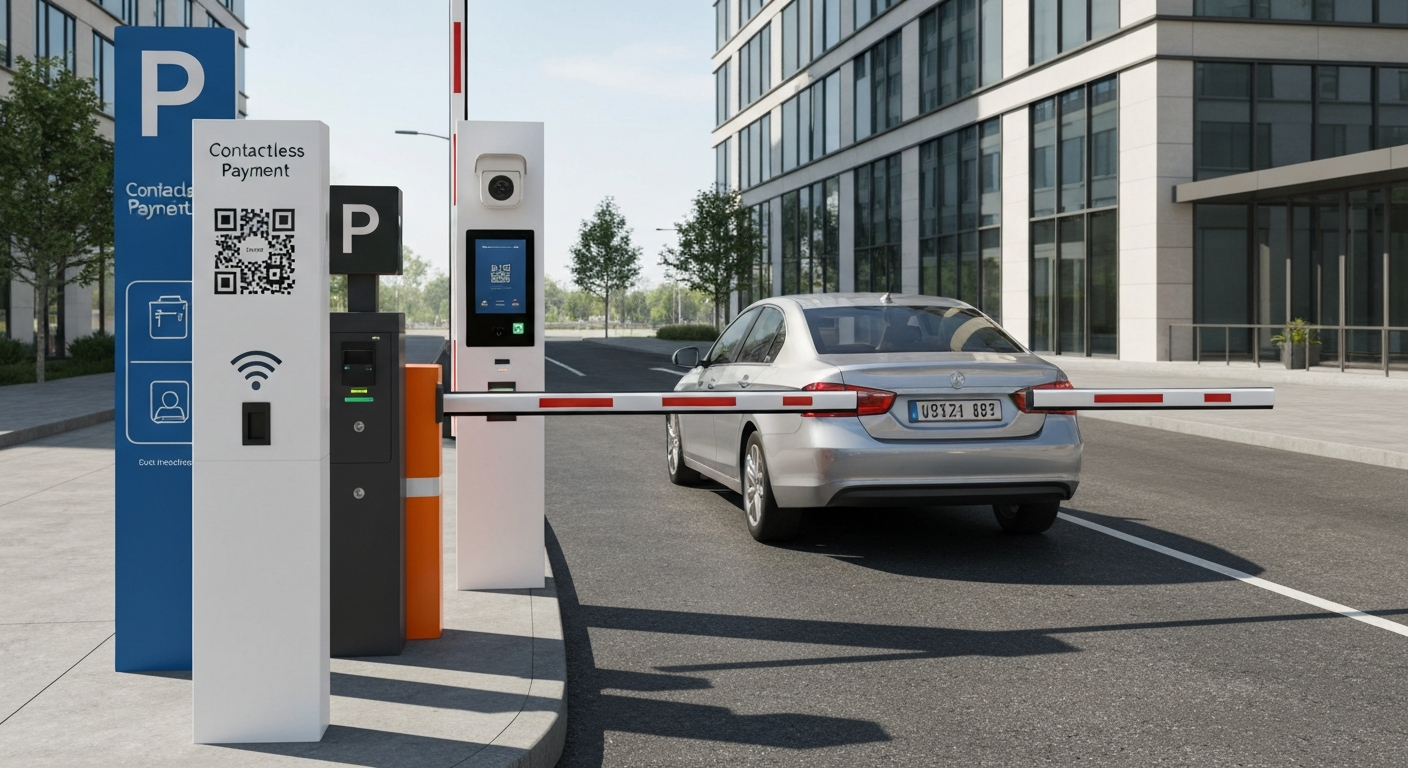
LPR with a gate or boom barrier
Record the stay. Confirm payment. Open the exit.
Connect license plate recognition, the driver’s payment and compatible gate controls in one automated parking workflow.
Scan before entry
The entrance camera reads the license plate and logs the entry time before the boom barrier or gate opens.
Match the driver to the stay
The driver scans the QR code to download or open the app and enters the license plate. PLACA matches it to the camera’s entry record and timestamp.
Read the plate at exit
A second camera reads the plate at the exit and logs the exit time. The recorded stay determines the parking balance shown to the driver.
Pay by phone and leave
The driver pays on the phone. Once payment is confirmed, the compatible exit barrier or gate opens automatically.
Plan for entry and exit cameras
A basic gated layout needs at least two physical cameras: one at the entrance and one at the exit. Camera quantity depends on the number and layout of entry and exit lanes.
Two-camera example: $198/month for software and 4G (2 × $99), plus $1,898 one-time for two standard cameras (2 × $949). Compatible Wi-Fi gate relay kits are $199 per controlled gate or barrier where required. Gate operators, barriers, installation and site work are quoted separately.
The investment adds automatic entry/exit records and payment-controlled gate release. The $99 rate is per physical camera, not a complete gated-lot package.
LPR without a gate or boom barrier
Match arriving vehicles to valid QR parking
Keep the lot open while adding automatic plate records and parking enforcement checks. LPR works alongside QR registration and payment, so your team can identify vehicles without a matching valid parking session.
Capture arrivals and departures
Cameras read plates and log entry and exit activity. Plan coverage for the lot’s entry and exit lanes so the system can identify vehicles that remain on site.
Match the QR registration
The driver scans the parking QR code and enters the license plate. PLACA compares that registration and its payment or permit status with the plate recorded by the camera.
Check after 15 minutes
If no exit is recorded after 15 minutes and no valid parking session, payment or permit matches the plate, PLACA flags a potential parking violation for review.
Notify the property’s towing operator
For properties connected to a participating towing company using PLACA, a potential-violation notification alerts the operator to a vehicle that may require enforcement. The operator reviews the record under the property’s parking policy and towing authorization before taking action. An alert does not itself authorize a tow.
A paid or otherwise authorized vehicle is not flagged simply for staying longer than 15 minutes. Entry and exit records, the matching parking session and the property’s rules are part of the review.
Explore TowCam parking enforcement software or view software pricing for your towing operator.
Tell us how many entry and exit lanes you have, whether there are gates, and how you manage parking enforcement. We’ll help scope QR-only, gated LPR or LPR without barriers.
Optional parking equipment
Only add the hardware your lot needs
Camera software and 4G cost $99 per physical camera/month. These one-time equipment prices are separate.
| Equipment | One-time price | What is included or quoted |
|---|---|---|
| Solar Wireless LPR Camera | $949 per physical camera | Solar panel, battery, wireless connectivity and camera hardware. |
| Compatible Wi-Fi gate relay kit | $199 per gate | For supported barrier or gate-control deployments. |
| Installation and site work | By quote | Mounting, posts, power, access, permitting and lift work depend on the location. |
White-label parking software
For businesses offering the platform under their own brand, branding and wholesale usage have a separate price structure. Direct customers do not pay those branding fees. View parking partner pricing.
Optional SMS
$0.04 per message segment or $39 per 1,000 segments. Additional usage is $0.04 per segment.
Hardware and site requirements
Hardware is separate from software subscriptions. Installation, mounting, power, posts, permits, gates, site work and special integrations are quoted where needed. Taxes and payment processing are separate where applicable.
Answers before you book
Frequently asked questions
Clear answers about pricing, equipment and the next step.
Is the QR parking software really free?
Yes. QR parking software has no monthly platform fee and supports unlimited QR parking sessions. Paid parking sessions have the stated driver convenience fee.
What is the standard parking convenience fee?
It is 8% of the parking charge, with a $1.49 minimum and $4.95 maximum. Premium event parking uses the same percentage and minimum with a $9.95 maximum. Payment processing and taxes are separate where applicable.
Do drivers need to install an app?
QR-only park-and-pay opens in a mobile browser and does not require a separate app. In the gated LPR workflow described above, the QR code directs the driver to download or open the app, enter the license plate and pay the balance matched to the camera-recorded stay.
Do I need a camera or gate for QR parking?
No. QR software works without a paid camera subscription. Optional parking LPR costs $99/month per physical camera including 4G. Compatible gate-controlled parking also requires the appropriate relay and gate equipment.
How many cameras does gated LPR parking need?
At least two physical cameras for a basic entry/exit layout: one entrance camera and one exit camera. Two subscriptions cost $198/month including software and 4G; two standard cameras cost $1,898 one-time. Additional lanes may need more cameras. Compatible relay kits are $199 per controlled gate or barrier where required; gate equipment and installation are separate.
What happens after 15 minutes in a lot without barriers?
When no exit is recorded and the plate has no matching valid parking session, payment or permit after the 15-minute grace period, PLACA flags a potential violation for review. A connected participating towing operator can receive the notification. Valid paid or authorized parking is not a violation just because it lasts longer than 15 minutes; a notification is not automatic towing authorization.
Is white-label pricing required to operate my own parking lot?
No. Direct parking customers can use free QR software and optional camera services. White-label branding and reseller usage are a separate partner offer.
Product details and guidance
Explore this service
Explore the software and equipment relevant to your operation.