

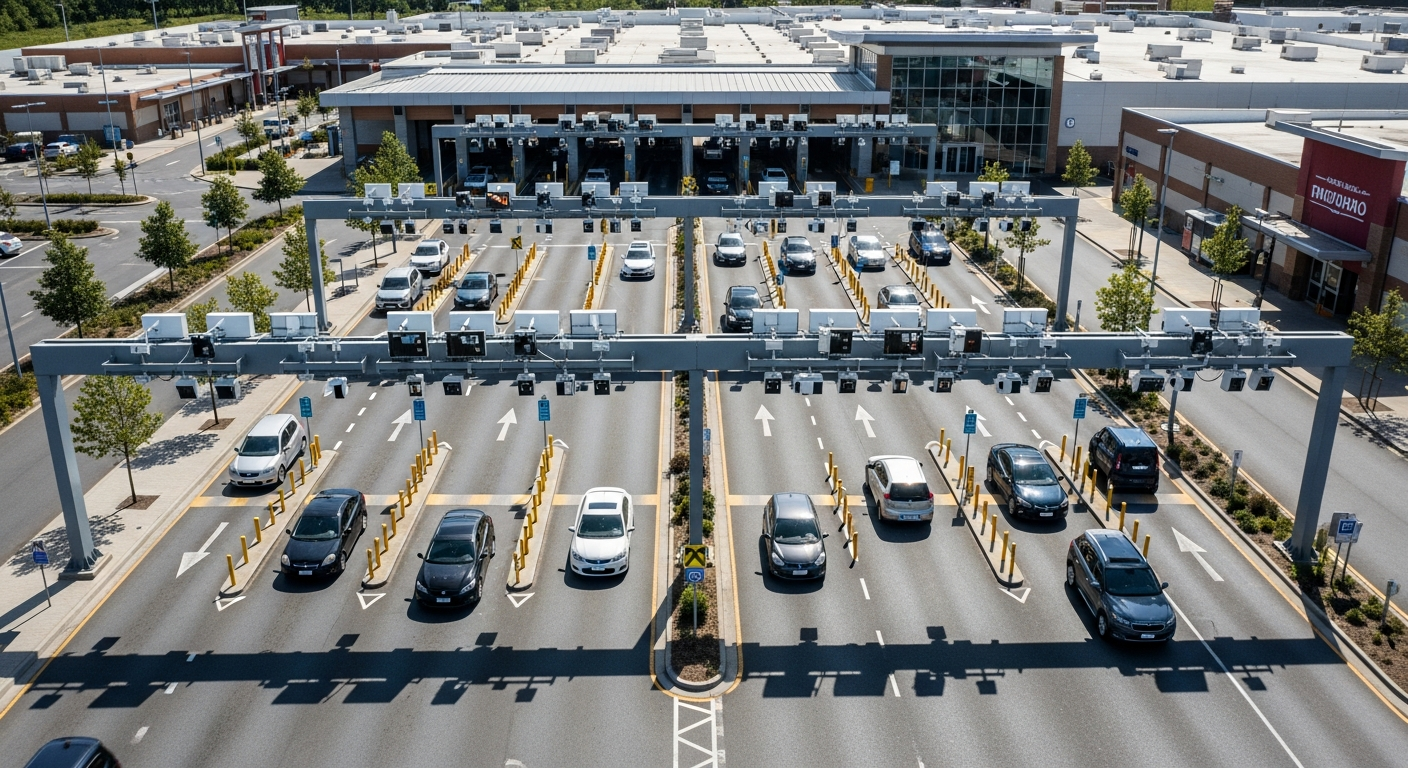
multi-lane plate capture how it works
How Multi-Lane Plate Capture Works
A practical guide from Placa for buyers comparing camera placement, LPR workflows, and private-property vehicle recognition options.
Why This Matters
License plate recognition is rarely solved by buying a camera at random. The camera must see the plate clearly, at the right angle, in the right lighting, at the expected speed. Then the software must turn that read into a useful vehicle event: a searchable log, access decision, alert, report, or evidence record.
Capture First
Check lane geometry, mounting height, distance, approach angle, glare, and whether cars stop, crawl, or pass at speed.
Workflow Second
Decide what should happen after a plate is read: open a gate, flag a vehicle, search history, notify staff, or document a parking event.
Recommendation Last
Only after those conditions are known should a camera tier be selected.
What to Compare
- Lane count and whether each lane needs its own capture zone.
- Vehicle speed and whether radar-assisted or radar-triggered capture is useful.
- Night performance, IR behavior, and headlight glare.
- Power and network access, including cellular and wireless options.
- Gate controller or parking workflow integration.
- Privacy policy, retention rules, user permissions, and search access.
How Placa Helps
Placa is a cloud AI LPR platform, not a generic camera storefront. The goal is to match the camera to the site, connect the camera to cloud LPR workflows, and help teams use the resulting vehicle events for safer, cleaner operations.
Related Placa Resource
Related Placa Resource
Camera Recommendation
Related Placa Resource
Related Placa Resource
Image Recommendations
Hero image: realistic private-property entrance with a visible LPR camera and subtle Placa dashboard overlay. Diagram: camera angle, capture zone, plate read event, and cloud dashboard. AI prompt: Create a clean modern SaaS-style image showing a private-property entrance with vehicles entering, an LPR camera mounted near the lane, subtle plate recognition overlay, and a Placa cloud dashboard UI. No police, no citations, no third-party logos.
FAQ
What should I know about multi-lane plate capture?
How Multi-Lane Plate Capture Works should be evaluated around plate capture conditions, camera placement, lighting, vehicle speed, lane count, and how the result connects to Placa cloud LPR workflows.
Is software or hardware more important?
Both matter. Software organizes plate events, search, alerts, and permissions, but the camera still needs a usable view of the plate.
What should the next step be?
The next step is a site assessment that reviews entrance geometry, speed, lighting, power, network access, and gate or parking workflow needs.
See Which Camera Fits Your Site
Share your entrance layout, speed, lane count, and current gate or parking workflow.
Source: National Center for Education Statistics
Source: National Center for Education Statistics
About Placa.ai
Placa.ai is a license plate recognition platform designed for property managers, HOA boards, school administrators, and parking operators who need reliable vehicle identification without enterprise-level complexity. The system pairs high-accuracy LPR cameras with cloud software that delivers real-time alerts, access logs, and direct integration with gate control systems.
Communities and facilities using Placa.ai gain automated vehicle identification that works around the clock. Setup typically takes one to two hours per camera, and the management dashboard is ready immediately after camera enrollment. All plate data is encrypted in transit and at rest, stored in compliance with applicable data protection standards, and accessible through the web portal or mobile app.
Placa.ai serves residential communities, commercial parking facilities, self-storage operators, K-12 schools, and private road associations across the United States. The platform scales from single-camera residential installations to multi-site enterprise deployments with centralized management.
To learn more or schedule a demo, visit placa.ai.
How Multi-Lane Plate Capture Works
Multi-lane plate capture uses one or more LPR cameras positioned to read plates across multiple parallel lanes simultaneously. Each camera covers a defined field of view, and software processes all lanes in real time to identify every vehicle passing through the capture zone.
How many lanes can one LPR camera cover?
A single wide-angle LPR camera can cover two to three lanes in a row if approach speeds are low and the camera is positioned at the optimal height and angle. For higher-speed or wider multi-lane environments, dedicated cameras per lane or a dual-sensor setup provides more reliable plate reads across all positions.
What is the minimum capture distance for multi-lane LPR?
Multi-lane setups typically require cameras to be mounted 10 to 20 feet from the capture zone to achieve the field of view necessary to cover multiple lanes. This distance must be balanced with maintaining sufficient pixel density on each plate. Cameras with varifocal lenses allow fine-tuning for the specific multi-lane geometry of each site.
How does multi-lane capture handle simultaneous vehicles?
LPR software processes video frames continuously and can identify multiple plates in a single frame. Each plate is assigned a unique capture event with its own timestamp. For enforcement or access control, simultaneous captures in adjacent lanes are processed independently, ensuring no vehicle’s plate event interferes with another’s.
Does multi-lane LPR work on highways or just parking areas?
Multi-lane LPR is used across environments including toll plazas, parking structure exits, commercial driveways with multiple lanes, and controlled access zones at schools and storage facilities. Radar-assisted triggering extends reliable performance to highway-speed multi-lane installations where shutter timing is critical.
Property managers, HOA boards, and facility operators looking to upgrade their vehicle identification systems can contact Placa.ai for a no-obligation site assessment. Our team reviews site-specific requirements and recommends the right hardware and software configuration. Installations typically complete within one to two business days, with full system training provided remotely or on-site.
For questions about system specifications, camera models, mounting requirements, or deployment timelines, the Placa.ai technical team is available to review each site individually. Site assessments are available at no cost and typically result in a written recommendation within 48 hours. Implementation support is included with all Placa.ai hardware purchases.
Related planning resources: multi-lane plate capture placement mistakes and dual-view LPR camera scenarios.