

How Staff-Controlled Dismissal Approval Improves School Safety
When your staff – not the system alone – authorizes every pickup, schools close the gap that leads to child safety incidents.
Request a Dismissal Workflow Review
In This Article
Every school day, hundreds of children walk out the door to waiting vehicles. In a perfect world, every adult in every car is authorized to pick up the right child. In reality, dismissal is one of the most chaotic and legally fraught moments of the school day – and most schools are managing it with paper lists, visual checks, or radio calls that leave no record.
Staff-controlled dismissal approval changes that equation entirely. Instead of a passive system where vehicles are simply matched to names, every release is an active decision made by a trained staff member, logged in real time, and traceable in a permanent audit trail.
This article explains what staff-controlled dismissal looks like in practice, why it dramatically reduces risk, and how to implement it at your school.
The Dismissal Gap Every School Has
Ask any principal what the most vulnerable moment of the school day is, and most will say dismissal. Here’s why:
- Volume and speed pressure: Elementary schools can dismiss 400-600 students in 20-30 minutes. Staff are under pressure to move the line.
- Authorization ambiguity: Paper pickup lists go stale. Parents add grandparents, remove non-custodial parents, or update permissions verbally at the office – and that information never reaches the carpool lane staff in time.
- No release record: When using manual processes, there is often no timestamped, staff-verified record of who picked up which child and when.
- Custody disputes: Schools regularly face situations where one parent is court-ordered to have no access to a child – but the carline staff member doesn’t have that information visible.
- Substitute staff: When regular front-office staff is absent, subs are handed a paper list with no context, no photos, and no guidance on exceptions.
A child released to an unauthorized adult – even by mistake – can expose the school to significant legal liability, harm a child, and destroy parent trust that takes years to rebuild. Manual systems have no margin for error, yet they rely on human memory and paper.
What “Staff-Controlled” Actually Means
Staff-controlled dismissal is not the same as automated dismissal. The key distinction:
Automated-Only System
A vehicle is identified by plate or QR code. The system automatically marks the student as released. No human authorization step. Fast, but no safety gate.
Staff-Controlled System
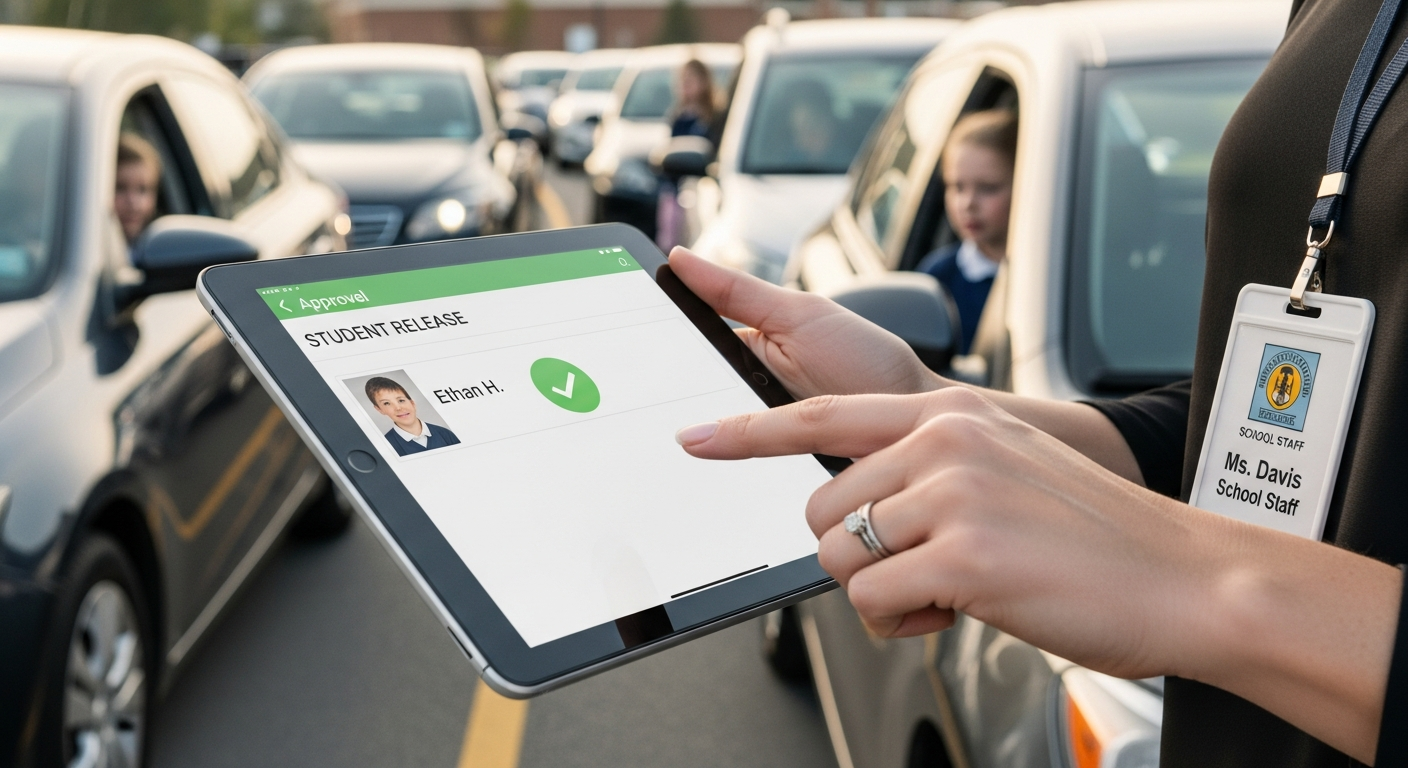
A vehicle is identified by plate or QR code. The system surfaces the student and authorization data. A staff member reviews and taps Approve Release. The student is called. Every release is a logged human decision.
In a properly designed school pickup platform, the technology handles identification and surface the data – but a trained staff member retains authority over every single release. The system augments human judgment; it doesn’t replace it.
Staff-controlled dismissal means the technology handles identification speed, but humans retain release authority. This hybrid model captures the best of both worlds: the speed of automation with the safety of human oversight.
6 Safety Layers Staff-Controlled Dismissal Adds
1. Real-Time Authorization Verification
When a vehicle arrives, staff see the current authorized pickup list for that student – not yesterday’s paper list. Changes made that morning by the office are instantly reflected. Staff are never working from stale data.
2. Custody Restriction Alerts
Courts issue custody orders. Schools are obligated to honor them. In a staff-controlled system, custody restrictions are flagged at the point of vehicle identification – a bright, unmissable alert tells the staff member that a court order restricts this individual before any interaction with the child occurs.
3. Photo Verification at the Window
Some platforms display the registered pickup person’s photo on the staff device at the moment of vehicle identification. Staff can visually confirm the driver matches the registered account – a simple check that eliminates impersonation.
4. Exception Handling Without the Office Bottleneck
When an unrecognized vehicle arrives or an unauthorized person attempts pickup, the system prompts the staff member to escalate – not improvise. The workflow guides staff through the right steps: verify ID, contact the parent, or hold the student safely.
5. Real-Time Notification to Parents
Parents receive a push notification when their child is approved for release. This means an unauthorized pickup – where the parent did not receive a notification – is immediately flagged. Parents become an active safety layer.
6. Timestamped Release Records
Every approval carries: the child’s name, the releasing staff member’s ID, the vehicle and driver information, and a precise timestamp. This record is permanent and retrievable for any compliance, legal, or incident review purpose.
The Dismissal Approval Workflow Step by Step
-
Vehicle Identification
As a vehicle enters the pickup zone, its license plate is captured by a camera, or the driver displays a QR code. The system identifies the vehicle in under two seconds. -
Student Profile Surfaces
On the staff’s tablet or dashboard, the linked student’s name, grade, photo, and current authorization status appear automatically. Staff see at a glance who is authorized to pick up this student. -
Authorization Check
The system displays whether the driver/vehicle is on the authorized pickup list. If there are custody restrictions or flagged notes, these appear prominently – before the staff member does anything else. -
Staff Approves Release
If everything checks out, the staff member taps Approve. The student’s name is queued for announcement or sent to the classroom via the system. The release is logged. -
Student Called to Vehicle
The classroom or dismissal coordinator receives the notification. The student is brought to the vehicle. A final confirmation check (student boards vehicle) can be logged. -
Parent Notified
A push notification is sent to the parent app: “[Child Name] was picked up at 3:22 PM by [Authorized Adult Name].” Parents know in real time. The school’s liability window closes.
See how this integrates with parent authorization tools in the parent-facing pickup request app overview.
How It Handles Real Incident Scenarios
| Scenario | Manual Process Outcome | Staff-Controlled Outcome |
|---|---|---|
| Non-custodial parent arrives | Staff may not know; paper list may be outdated | Custody restriction alert fires; staff follows protocol before any interaction |
| Parent sends unlisted neighbor | Staff must call office; line backs up; inconsistent outcome | Parent sends one-time digital authorization from their phone; staff sees it instantly |
| Regular grandparent pickup | Relies on staff knowing the grandparent by face | Grandparent’s vehicle is registered; photo displays at identification; no ambiguity |
| Child’s parent calls to say “don’t release today” | Office must manually contact carline staff; message may not reach in time | Parent or office adds hold note via app; staff device shows hold alert immediately |
| Incident investigation – who picked up child at 3:15? | No record; reliant on staff memory | Timestamped audit entry: staff ID, vehicle, driver authorization level, exact time |
Audit Trails: Your Legal and Safety Net
The audit trail is often undersold but is among the most valuable features of a staff-controlled dismissal system.
– Elementary School Principal (Southeastern US district)
A compliant dismissal audit trail should capture:
- Date, time, and exact release timestamp for every student
- Releasing staff member identity (not just “the carline”)
- Vehicle and driver information linked to the release
- Authorization method (registered vehicle, one-time QR, office exception)
- Any flags or holds that were active and how they were resolved
- Parent notification timestamp
This record is exportable for FERPA compliance reviews, district safety audits, insurance documentation, and legal proceedings. Learn more about how this connects to your student data privacy and FERPA obligations.
See How Dismissal Approval Works at Your School
Get a workflow review tailored to your dismissal process – we’ll map your current gaps and show you exactly how staff-controlled approval fits your setup.
Frequently Asked Questions
Internal Resources
- School Reassignment Pickup Workflow for New Campus Moves
- How Private Schools Can Shorten Pickup Line Delays With Better Vehicle-Based Workflows
Related Resources
Data reference: National Center for Education Statistics
Related planning resource: one-lane pilot for staff-controlled dismissal.
Related planning resource: LPR accountability for staff-controlled dismissal.
Related planning resource: vehicle verification in staff-controlled dismissal.
Related planning resources: LPR in school car lines, camera placement for accountable dismissal and principal guide to dismissal software.
Related Staff-Approved Dismissal Resources
These resources explain how school pickup software supports staff approval without automatically releasing students.
- School Pickup Line Software
- School Car Line Software for Elementary and Middle School Dismissal
- Parent Pickup App for Schools vs Vehicle Recognition
- Carline Automation Software
- School Dismissal Management System
- School Car Rider Dismissal Software for Safer Afternoon Pickup
- QR code school pickup system for privacy-conscious families
- authorized student pickup software concepts